Discrepancy Desk
A case-based workspace for the invoices that need investigation.
I designed this project around an accounts payable task I know: tracking an invoice discrepancy until it is resolved. Instead of entering every invoice, the user adds the ones that need attention and keeps the issue, contacts, next action, and resolution together.
The problem
When an invoice does not match expectations, the work extends beyond recording its due date. The discrepancy needs a clear description, a disputed amount, a follow-up plan, and a record of the conversations that led to a resolution.
The approach
A bold workspace with top navigation keeps Active cases, Archived cases, invoice details, and follow-up history organized. Payment due dates and the age of an unresolved issue are tracked separately. A custom calculator, line graph, and magnifying-glass logo reflects the accounting and analytics workflow.
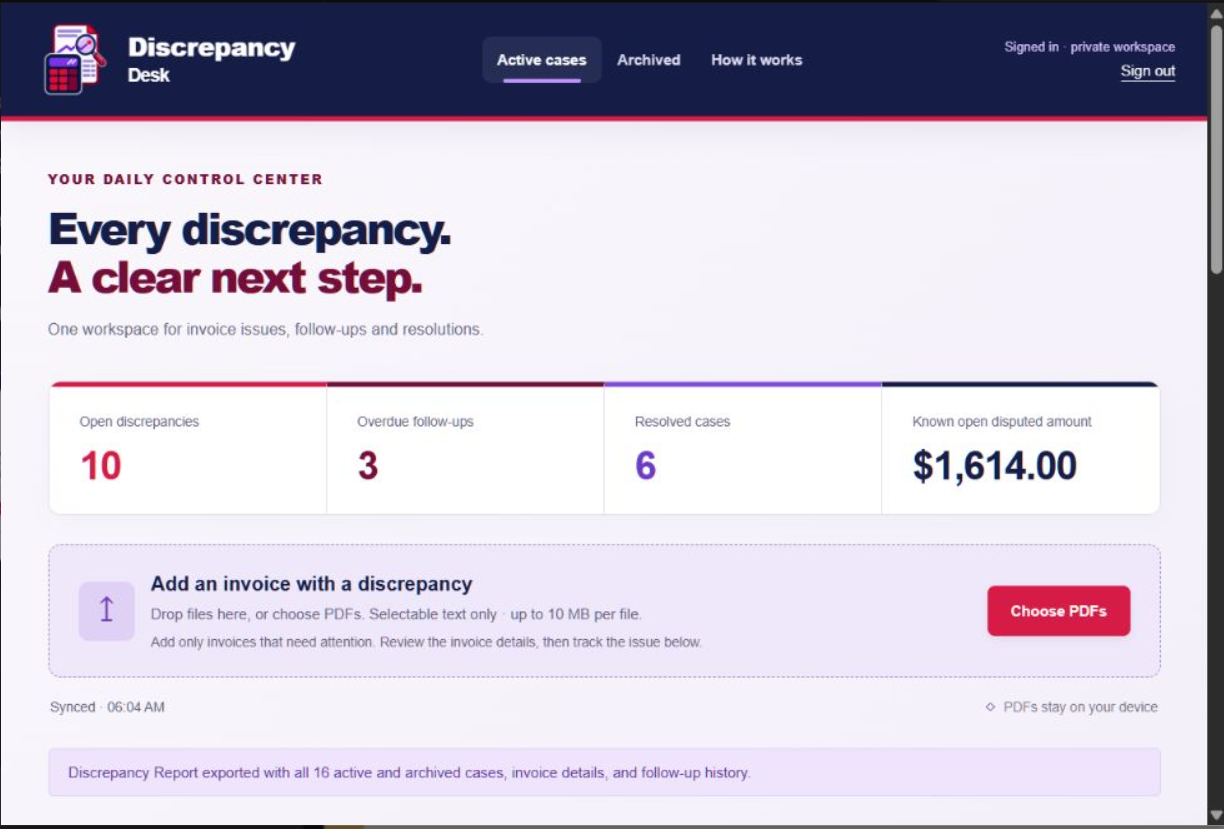
Paving the road between discrepancies and resolutions
- Start the day by uploading the previous day’s Discrepancy Report. Active and Archived cases return to their appropriate tabs. Add a text-based PDF invoice and review the extracted details when needed.
- Describe the discrepancy, enter the disputed amount, and set an owner and next action.
- Log contacts and follow-ups as the investigation progresses.
- Close the case with a resolution note and date. It moves into a searchable archive and can be reopened.
- Choose Export Report to Excel at the end of the day. The dated Discrepancy Report includes Active and Archived invoices, vendor contacts, follow-up history, aging summaries, charts, and pivot tables.
Project scope
This independent project was developed with AI assistance to demonstrate discrepancy investigation, accounting process design, Excel reporting, and a working browser application. The sample report includes 16 fictional invoices: 10 Active cases across aging buckets and 6 resolved cases.
Text-based PDF extraction requires review; scanned PDFs and email inbox ingestion are not included. Independent Google, LinkedIn, and Facebook sign-in passed user testing. Email/password sign-in is also configured. Signed-in users have separate case workspaces, and the sample-case button is hidden after sign-in. A live two-device sync check remains outstanding; Facebook currently supports the app’s authorized testers while Meta public-app review remains incomplete.
The app is publicly accessible without ChatGPT. Visitors can explore fictional sample cases without signing in, or use independent sign-in to sync their own case workspace.